
 Dominican Republic
What the e-ticket is
The Dominican Republic e-ticket is a free digital form the government asks every traveler to complete before flying in and before flying out. When it is accepted, the government issues a single QR code that airlines check at the gate and immigration scans on arrival.
There is one place to complete it, the government's site at eticket.migracion.gob.do, and it costs nothing to do yourself.
Who needs one
Everyone crossing the border needs one, regardless of nationality or the reason for the trip. That includes tourists and residents returning home.
- Every traveler needs a QR code, including infants and children.
- One form can cover a family or group traveling together on the same trip, up to 7 travelers.
- You need one for entering and one for leaving, and the portal can produce both in the same session.
When to fill it out
Any time before you travel, once your flights and accommodation are confirmed. Most people do it a few days ahead, which leaves room to fix anything before the flight. The details have to match your passport and your flight, so it helps to have both booked first.
What you will need before you start
Gather everything for the whole group before you open the form. The fields below are the ones the portal actually asks for, taken from its own screens.
| What the portal asks for | What you need to hand |
|---|---|
| Personal details | Given names, first and second surname, place of birth, date of birth and sex, for each traveler |
| Passport details | Passport number and expiry date, and the nationality on the passport |
| Flight information | Airline, flight number, flight date, origin, destination and the booking confirmation number |
| Accommodation | Hotel name from the portal's fixed list, or a full province, municipality, sector and street address for a private rental |
| Contact details | An email address, a phone number and a country of residence |
| Customs answers | Whether you carry more than US$10,000, live animals, plants, food, or goods subject to taxation |
Step by step
Here is the flow from a blank form to a QR code, screen by screen, as the portal presented it when these pictures were taken.
Answer the trip questions
The portal opens by asking whether you are leaving the Dominican Republic, whether you have layovers on the way, and whether you are a resident. Your application code appears on this screen, before you have entered anything personal. Save it: it is what reopens the form later.
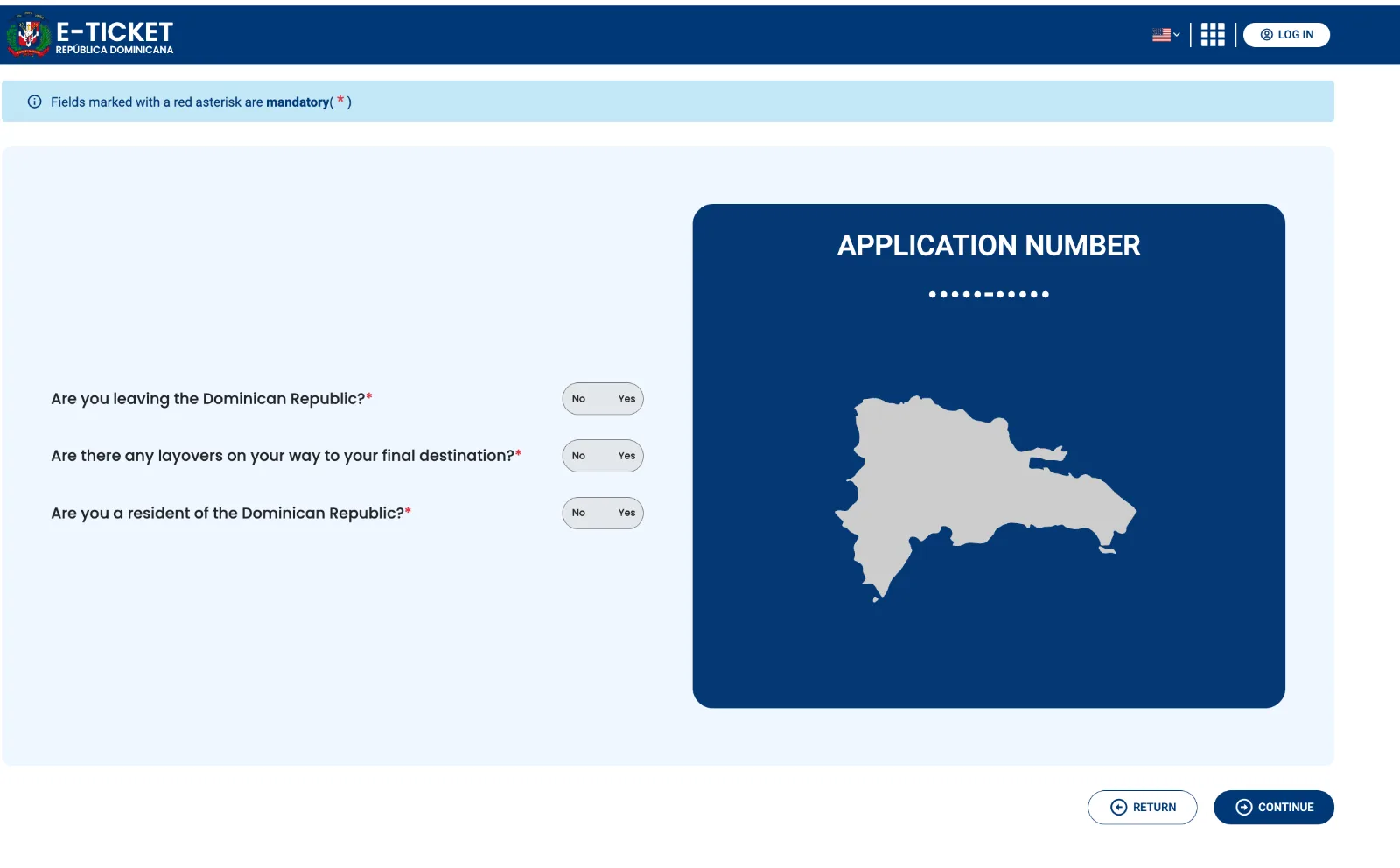
The opening screen. The application code is issued here, before any personal details are entered. It is masked in this picture. Screenshot of the government's site, eticket.migracion.gob.do, captured 2026-08-29. This is not our interface. Enter each traveler's personal details
Names, place of birth, date of birth and sex, copied straight from the passport. The portal asks for a first and a second surname separately, and whether the nationality on the passport differs from the place of birth.
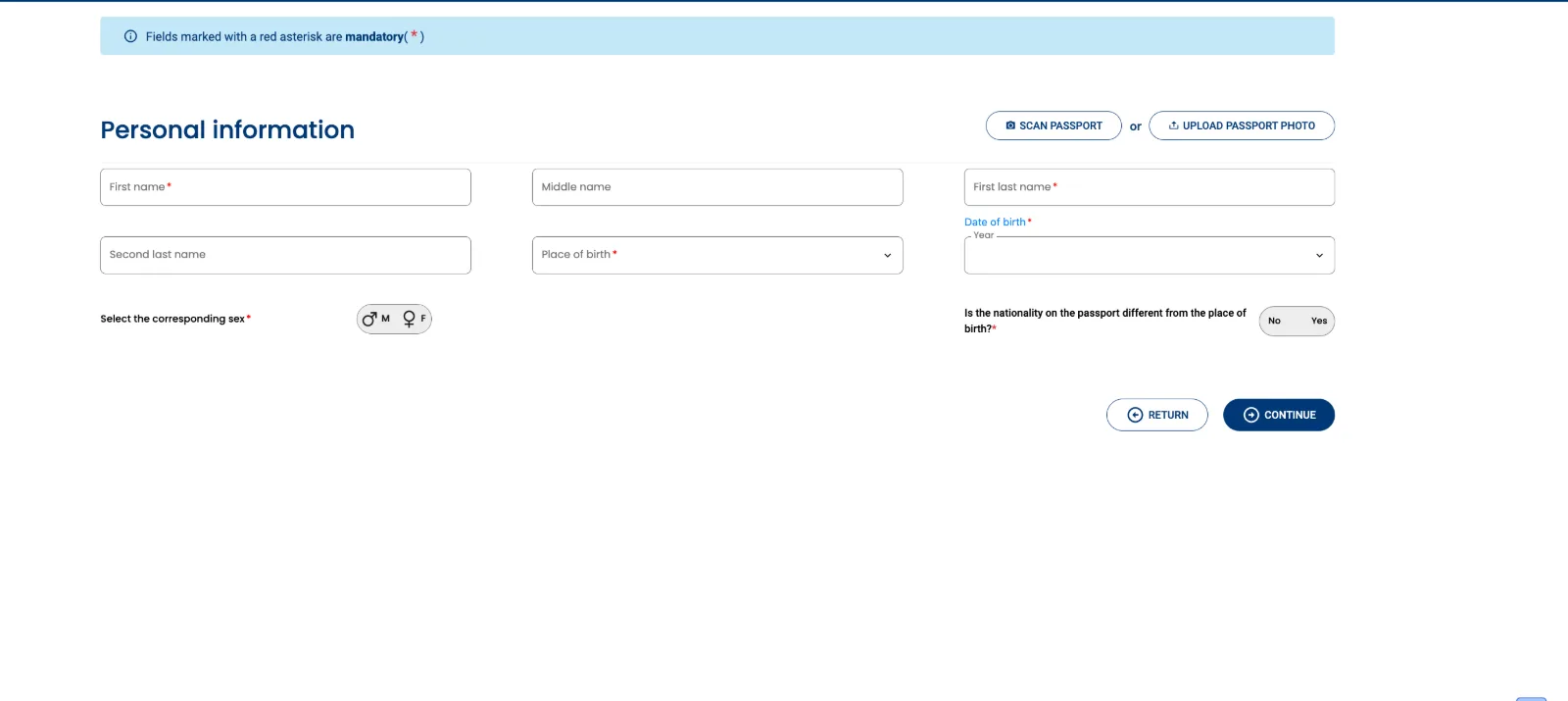
The personal details screen, blank. Fields marked with a red asterisk are the portal's own required fields. Screenshot of the government's site, eticket.migracion.gob.do, captured 2026-08-29. This is not our interface. Add passport, contact and address details
Passport number and expiry, then how to reach you: phone, email, country of residence, city and address. The passport number is asked for twice, so it has to match.
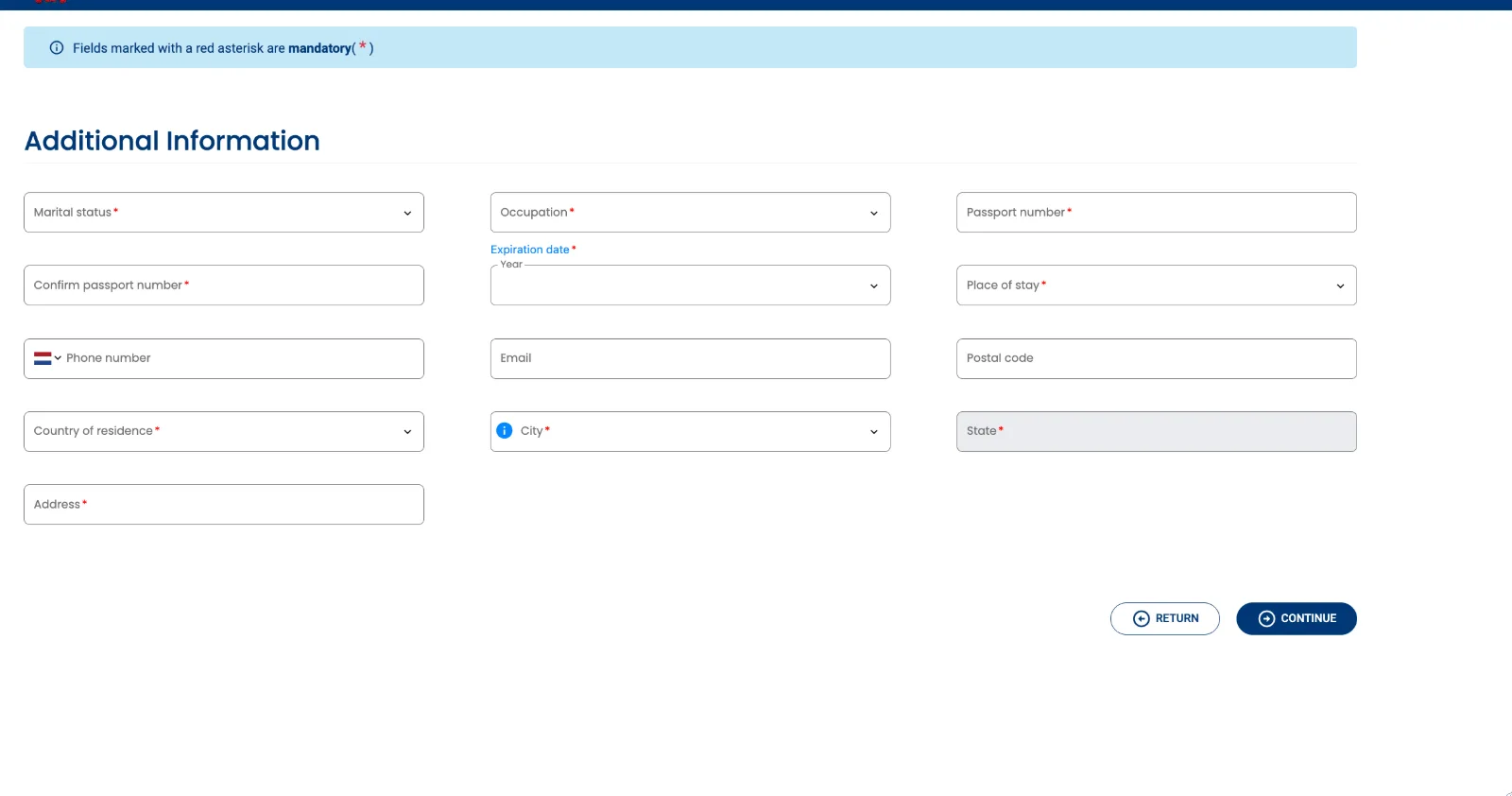
The second details screen. Passport number and confirmation sit side by side, which is where mismatches happen. Screenshot of the government's site, eticket.migracion.gob.do, captured 2026-08-29. This is not our interface. Add the flight and where you are staying
Flight date, airline, flight number, origin, destination and your booking reference, then the place of stay. Hotels come from a fixed list the government maintains; a private rental needs a full address.
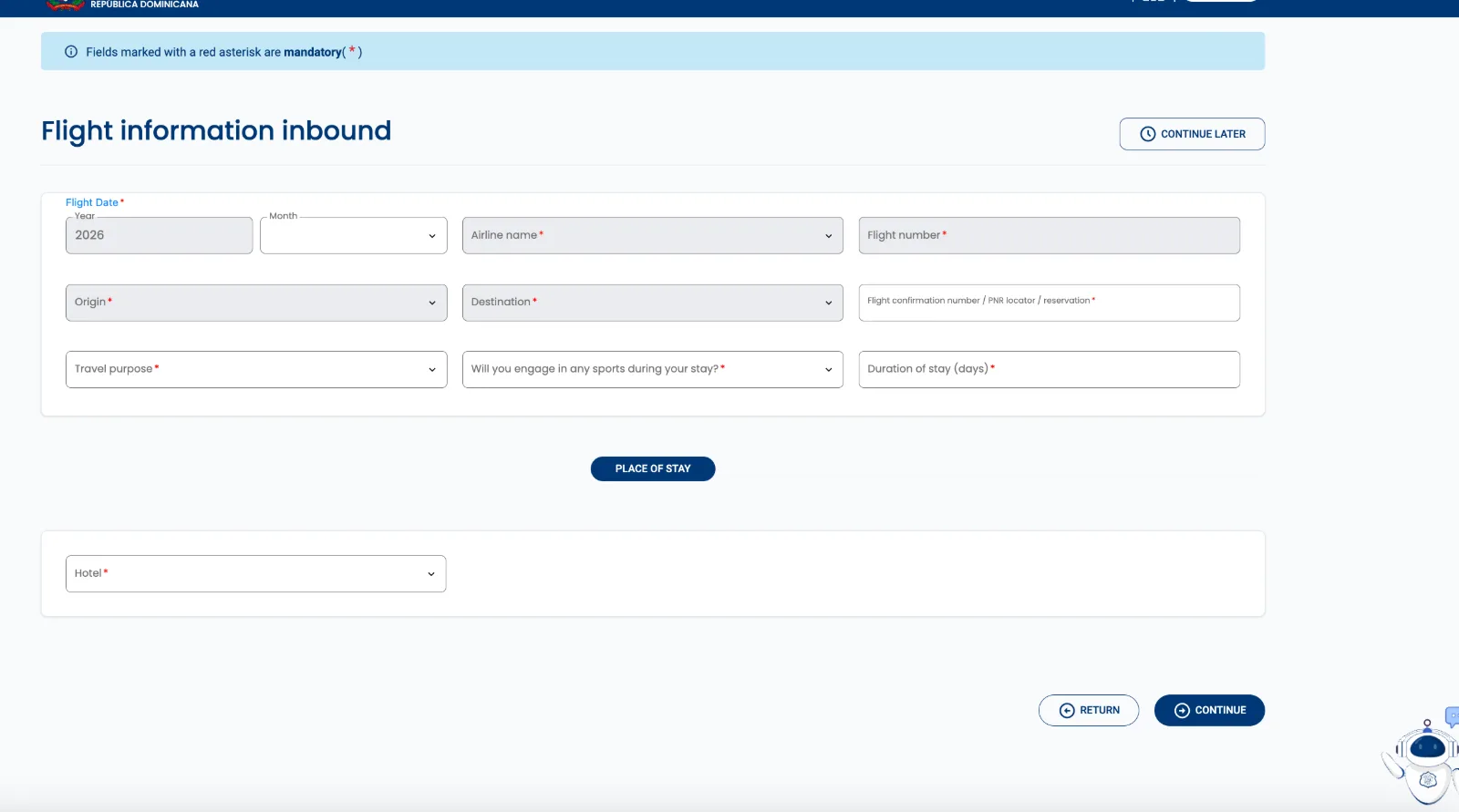
Flight details and place of stay. The accommodation field is required on the entry half; the exit half does not ask for it. Screenshot of the government's site, eticket.migracion.gob.do, captured 2026-08-29. This is not our interface. Answer the customs questions and submit
Five yes-or-no questions about what you are carrying. Then the portal shows a preview of everything before you submit, and issues the QR code.
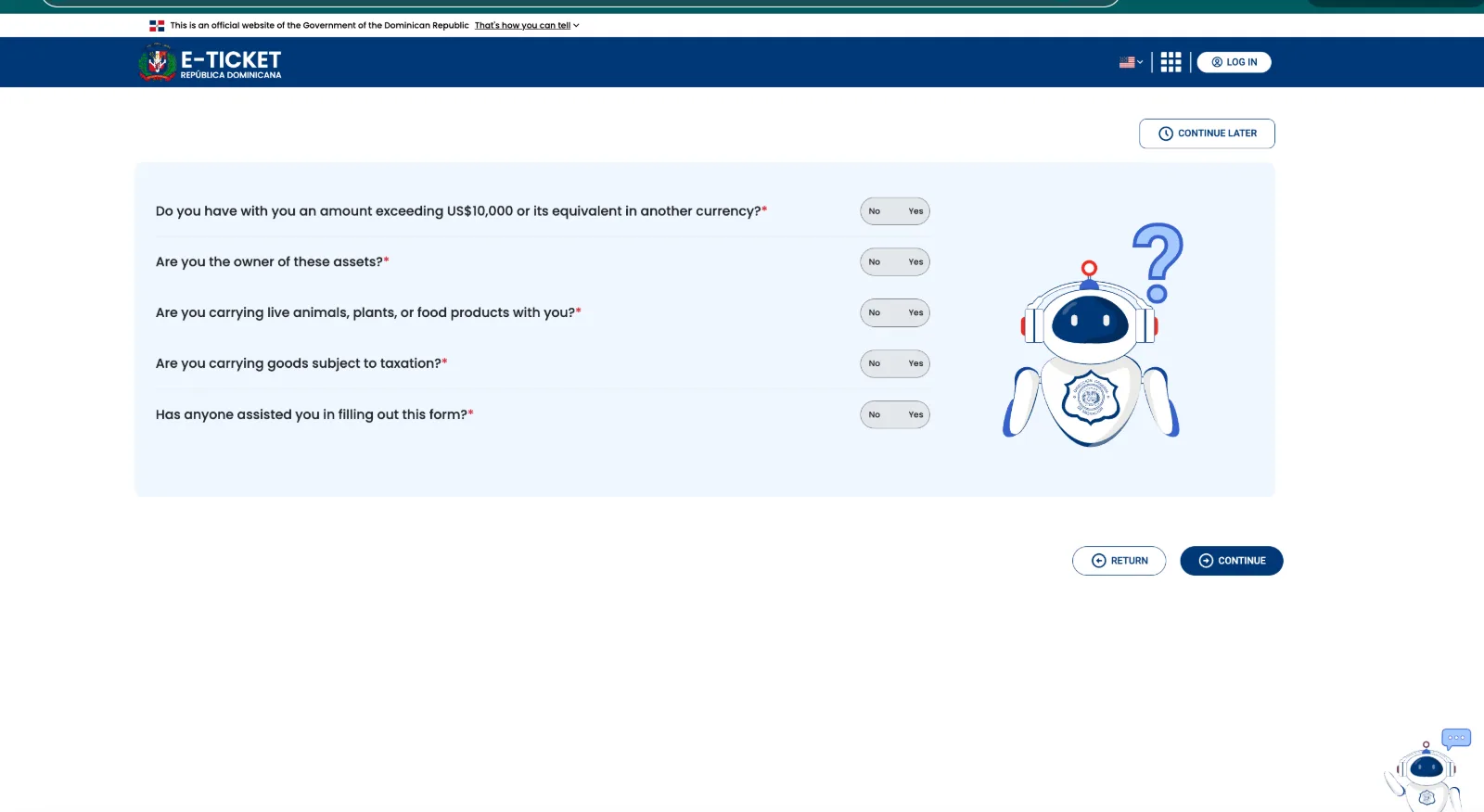
The customs questions. The last one asks whether anyone helped you fill in the form, which you answer honestly if you used a service. Screenshot of the government's site, eticket.migracion.gob.do, captured 2026-08-29. This is not our interface.
Rather not fill it in yourself?
We complete and check the whole group's form, entry and exit, and send back the government's QR.
From $29 for your whole group
Get startedThe official form is free at eticket.migracion.gob.do.
Common mistakes
- Losing the application code, which is what reopens your own form.
- A mismatch between the passport number and its confirmation field.
- Answering the trip questions for one direction and stopping before the exit half.
- Typing a name shorter than the passport prints it.
Traveling with children
Children and infants each need their own QR code, but they do not need their own form. Add them as additional travelers on the same application as the adults they are traveling with.
Have each child's passport to hand, because the portal asks for the same passport details it asks for adults.
Entry and exit, and why the exit half surprises people
The e-ticket covers two directions, and both are required. Many travelers deal with the arrival half, enjoy the trip, and only discover at the airport that the departure half was needed too.
The portal offers the exit half at the end of the entry flow, in the same session, rather than as a separate application you come back for. It does not ask for accommodation on the exit half, but it does ask for every traveler's flight and passport details again, so it is worth doing both while the details are in front of you.
Punta Cana and the other DR airports
The same form covers every Dominican airport, arriving and leaving. It is not tied to a single airport, so you file once no matter where you land.
- Punta Cana International (PUJ)
- Las Américas, Santo Domingo (SDQ)
- Cibao, Santiago (STI)
- La Romana (LRM)
Frequently asked questions
- Is the Dominican Republic e-ticket free?
- Yes. It is free at eticket.migracion.gob.do. ArrivalHelp is a private service you can pay to complete and check it for you.
- Do I need an e-ticket for the Dominican Republic?
- Yes. Every traveler needs one to enter and to leave, including children and infants.
- When should I fill it out?
- Any time before you travel, once your flights and accommodation are confirmed. A few days ahead leaves room to fix anything.
- Do children need an e-ticket?
- Yes. Each child needs a QR code, added as a traveler on the same form as the adults they travel with.
- Do I need one to leave the country too?
- Yes. Both directions are required. The portal offers the exit half at the end of the entry flow, in the same session, and it is the half people most often miss.
- What if I make a mistake after submitting?
- The finished e-ticket carries a modify option, and your application code is what reopens the form. If a correction cannot be made, filing again is the safest route.
This page is checked against the government portal. If something has changed, tell us. support@arrivalhelp.com